Enrollment (If not enrolled)
Click on Enroll Now on the App Landing Page
The reCaptcha Screen is shown.
Complete reCaptcha
Enter Member ID; if less than six digits, enter leading zeros. Example 003456
Enter Member Number
Enter Pin (last 4 digits of SSN)
Enter SSN:
Create Logon ID & Security Code
Enter the New Logon ID you want to use
Enter New Security Code
Renter Enter Security Code
You have successfully enrolled
Click OK
App Landing Page is presented
Enter your new Logon ID
Enter your new security code
Click Log in
Select Security Question Screen
Select three questions and enter the answers
Click Save
Accept Online Banking Terms & Conditions
Profile Incomplete Screen
Enter email address two times
Click on Save
Back to the App Landing Page
Enter Logon ID & security code
Accept Mobiliti Terms & Conditions
You are now enrolled!
Features
Instant Balances without logging in
Check Images
Transfer funds between accounts
Account Alerts
Hide/Show Accounts
Nickname Accounts
Biometric Login for both iOS and Android
Bill Pay
Mobile Deposit (Coming soon!)
How to Set Up Mobile Alerts
Contact us for details on activating mobile alerts.
Bill Pay
Note: You must first be enrolled in Bill Pay on Online Banking.
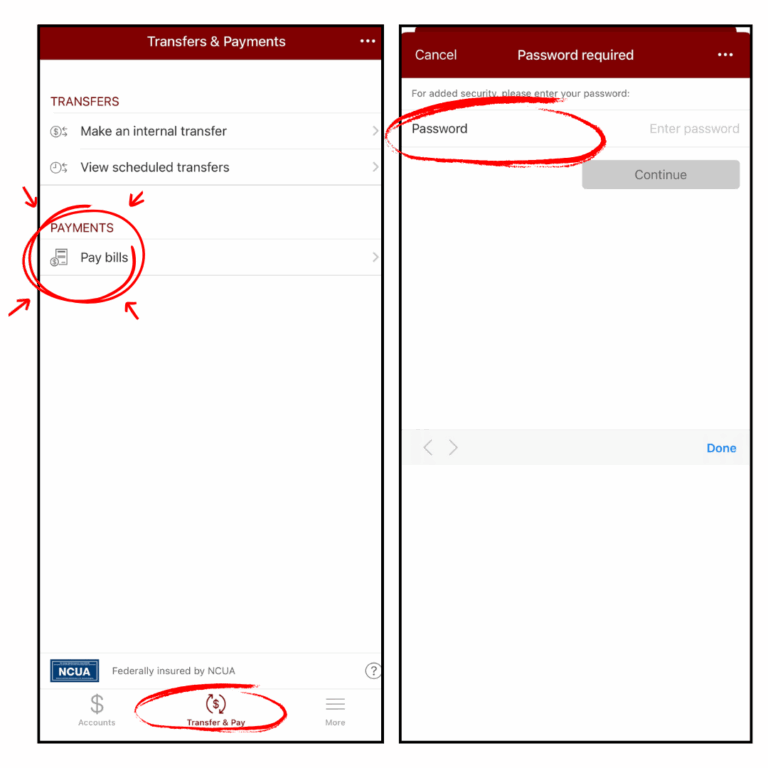
Once logged in to the Mobile Banking App, go to the Transfer & Pay tab at the bottom of your screen. Under PAYMENTS, tap Pay Bills. It will prompt for a password. This is your same password to get into Online and Mobile Banking.
Please see the screenshots below: